
Insights / Technical notes
Cloudflare Vectorize Implementation Guide: Safely Sync Public HTML
A detailed guide to building a corpus from public HTML, keeping Pagefind available, and operating Vectorize synchronization safely.
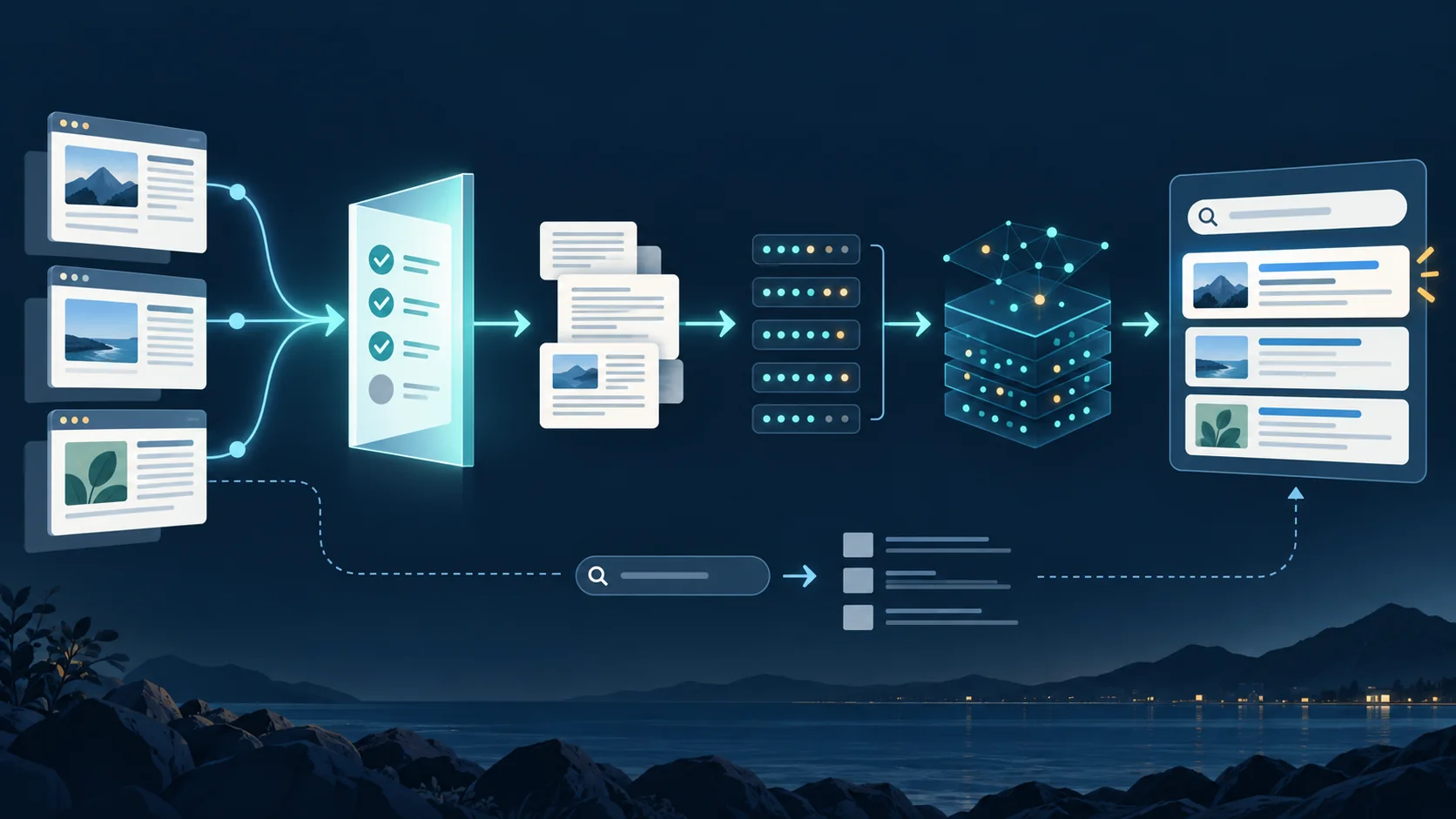
Table of contents
- Start here: what is Cloudflare Vectorize?
- What improves when you add it?
- Layer it over the existing search first
- Conclusion: keep search fail-soft, but synchronization and release fail-closed
- Decide these four things first
- Divide responsibilities instead of replacing Pagefind
- Build the corpus from published HTML, not CMS drafts
- Make incremental synchronization deterministic with content hashes
- Fix the embedding model and index settings as a contract
- Upsert, wait for convergence, and only then delete
- Use a replacement index for a large deletion or model change
- Disable this site’s semantic search in Preview and make Production the sole high-privilege synchronization target
- Synchronize to Production only the corpus for the currently published commit
- Put cost and privacy boundaries around the public search API
- Give related search and generative AI chat separate contracts
- Do not mix the responsibilities of search destinations
- Failures we encountered and what we changed
- Record “implemented” in four stages
- Minimum architecture for another rollout
- Summary
- October 6, 2026 update: distinguish zero matches from invalid responses
To trial incremental sync, regenerate the corpus from identical public HTML and first verify unchanged content causes no additions or deletions. Then use a small article change to check mutation completion and search results against Cloudflare Vectorize: API. Define mass-deletion stop thresholds separately from product limits.
Update, September 26, 2026: Acecore Systems search uses Cloudflare Workers AI BGE-M3 and a dedicated 1024-dimensional Vectorize index. Changing the model requires rebuilding the matching corpus and index. The approach below—syncing from published HTML while retaining Pagefind—still applies.
Start here: what is Cloudflare Vectorize?
Cloudflare Vectorize is Cloudflare’s vector database. It stores embeddings — numerical representations of the characteristics and meaning of text, images, and other data — then finds information whose meaning is close to an input. As the official overview explains, it can support semantic search, recommendations, classification, and the retrieval layer for future RAG applications.
Ordinary keyword search is excellent at quickly finding a page that contains a product name, proper noun, or error code. Vectorize instead helps when the words do not exactly match. A question such as “I want to improve my site” can surface a page about ongoing web-operations support or technical advisory work, even though the wording differs.
Vectorize is not, by itself, a chatbot that generates an answer. It is a search foundation that selects relevant published pages and their URLs. If generative AI is added later, those results can become the evidence layer for the response.
What improves when you add it?
- Find paraphrases and question-style queries: Readers do not need to know the exact terms used on the site to reach an intent-adjacent page.
- Connect related knowledge across content: Articles, FAQs, and service pages that use different wording can still be discovered through their similarity.
- Strengthen rather than replace the current search experience: Use it only for an explicit “find related information” action while retaining keyword search, and discovery can improve without rebuilding the whole UI.
- Reuse the retrieval layer later: Returning the original page and URL makes the same layer useful for cited AI answers, related articles, or content recommendations.
Semantic search is not magic, however. Its quality depends on a correctly selected public corpus, an appropriate embedding model, and evaluation of real search results. It should not replace ordinary search for exact product names or codes.
Layer it over the existing search first
For an initial rollout, keeping the existing keyword search and calling Vectorize only when a reader explicitly asks to find related information is the most approachable pattern.
- Use Pagefind or another ordinary search for product names, proper nouns, and short exact terms.
- Use Vectorize related search for questions, paraphrases, and adjacent themes.
- Leave ordinary search available if the embedding provider or Vectorize fails.
That is the value and scope to judge first. The rest of this article turns those decisions into implementation and operating practices that can be reused on Astro, Cloudflare Pages, and other static sites.
A practical first configuration: Disable this site’s Vectorize search in ordinary Pages Preview with
SEARCH_ENABLED=false, and limit Vectorize/D1 bindings and automated synchronization to Production. Use Preview to check the search UI and Pagefind fallback; in Production, synchronize only a corpus generated from the published commit. Requests to the shared network search API follow a separate path. This keeps experimental permissions and data out of live search.
When planning a rollout, it becomes clear that simply “creating embeddings and calling query()” is not enough. You must decide how to build the search corpus, how to disable this site’s Vectorize search in Preview while protecting Production, how to prevent an incorrect synchronization from causing mass deletion, and whether the published pages really match the index. In real operations, the design around the Vectorize API call matters more than the call itself.
Conclusion: keep search fail-soft, but synchronization and release fail-closed
The most reusable principle was to apply different failure policies to user-facing search and operator-facing synchronization.
| Area | Failure policy | Reason |
|---|---|---|
| Ordinary site search | fail-soft | Continue searching with Pagefind even if Vectorize is unavailable |
| Related-search API | fail-soft | Fail quickly without disrupting ordinary search results |
| Corpus generation | fail-closed | Do not generate a corpus if target pages, locale, counts, or metadata are invalid |
| Index synchronization | fail-closed | Do not change anything unless the target environment, existing IDs, deletion rate, and mutations can be verified |
| Production enablement | fail-closed | Enable only after the published commit and corpus agree and Production synchronization and mutations converge |
This simultaneously ensures that “site search remains available even when AI search is down” and that “a suspicious synchronization changes no records at all.”
Decide these four things first
Before choosing a provider or an index name, decide these four things. They make the rest of the architecture much easier to select.
| Decision | Accessible first choice | Why |
|---|---|---|
| User goal | “Find related pages” | You can evaluate search quality before adding answer generation. |
| Search entry point | Vectorize on submission; Pagefind on failure | It keeps data transfer and fallback behavior clear. |
| Source of truth for the corpus | Published HTML | Drafts and administration pages stay out of search results. |
| Release flow | Verify the UI in Preview; synchronize Production only | Experimental permissions and data do not reach live search. |
Once these four questions are answered, you can choose an embedding provider, D1, R2, or answer generation later according to your requirements.
Divide responsibilities instead of replacing Pagefind
The purpose of introducing Vectorize was not to discard the existing search.
Pagefind builds a static index from built HTML and searches it in the browser. It works well as ordinary search for explicit terms such as product names, service names, and proper nouns, and it does not depend on the state of an embedding provider or Vectorize.
Vectorize is useful when a search phrase does not exactly match the body text or when a user wants to find a page through a related concept. It does, however, require embedding generation and a Vectorize query, so external-service latency, errors, and usage must also be considered.
We therefore separated the UI behavior as well.
- Do not search while the user types; call the related-search API only on submission
- Run Pagefind when related search fails or returns no results
- Set a short timeout on the API
- Use Pagefind fallback to absorb API failures
- Allow the kill switch to disable related search alone
The current search modal does not search while the reader types. Only when the reader runs “Search” is the term sent to this site’s search API, as the UI discloses. Cloudflare Workers AI @cf/baai/bge-m3 converts it to an embedding for comparison with this site’s public information in Vectorize. If related search fails or returns no results, in-browser Pagefind runs as the fallback. The term may then be sent to the shared Acecore search API (acecore.net) to show public information from related sites. The UI advises against entering personal or confidential information.
With this architecture, Vectorize broadens the search experience without becoming a single point of failure for all search.
- Classify the retrieval Distinguish matches, a valid zero-result response, failed or non-2xx fetches, and malformed data.
- Site search UI The static Pagefind fallback belongs to the site search UI; keep it separate from reply evidence.
- External reply decision Zero results are not evidence. Hold on failures or invalid data; production use of the stop condition is unverified.
Build the corpus from published HTML, not CMS drafts
One of the largest differences across sites was the choice of source of truth for search.
If CMS drafts or Markdown files are inserted directly into the corpus, they can diverge from the pages users actually see.
draftornoindexcontent can be included- Pages with an external canonical URL can remain in the corpus
- Repeated layout text and administration UI can be included
- Titles, descriptions, and URLs that appear only after transformation cannot be reflected
- Locale boundaries can become ambiguous on multilingual sites
We therefore read the HTML generated by the Astro build and applied the publication rules before building the corpus.
For a Japanese site, a manageable starting point is to include only pages that meet all of the following conditions.
- Has a same-origin canonical URL
- Uses Japanese as its
lang - Is not marked
noindex - Is not
/admin,/api, a 404 page, or a submission-complete page - Can exclude non-body elements such as navigation and elements marked
data-vectorize-ignore - Has a published root-relative URL and title
We split the body into chunks targeting 850 characters, with a maximum of 1,200 characters and an overlap of 120 characters. These are operating values selected for the page lengths and Japanese body text in this project, not universal answers. For another site, adjust them after evaluating the actual document structure and search results.
Make incremental synchronization deterministic with content hashes
If vector IDs are sequential numbers or runtime UUIDs, regenerating the same corpus gives every record a different ID. Unchanged content must then be embedded again, and the old IDs must be deleted in bulk.
Instead, we generate a SHA-256 value from the locale, published URL, chunk number, and body text, then derive both the ID and corpus version deterministically.
const identity = [locale, url, String(chunkIndex), text].join("\u001f");
const digest = sha256(identity);

const vector = {
  id: `v1-${digest.slice(0, 48)}`,
  text,
  metadata: {
    locale,
    url,
    chunkIndex,
    contentHash: digest,
  },
};
During synchronization, compare the expected IDs with the IDs currently in the index.
- Embed and upsert IDs that exist only in the expected set
- Skip IDs found in both sets because they are unchanged
- Treat IDs found only in the index as deletion candidates
- Stop before any mutation if an ID not managed by the
v1-namespace is present
This produces the same corpus from the same published content and makes the reason for each difference easier to explain.
Fix the embedding model and index settings as a contract
Choose an embedding provider and model based on the target languages, search quality, latency, and cost. Acecore Systems currently uses Workers AI @cf/baai/bge-m3 with a dedicated 1,024-dimension cosine index. If you adopt another model, inspect its actual output and migrate to a separate index for the new contract. Never mix vectors with different dimensions in one index.
The important point is not the model name itself, but keeping the same contract in four places.
| Location | Fixed values |
|---|---|
| Corpus metadata | model, dimensions, metric |
| Vectorize index | dimensions, metric |
| Search API | model, embedding length |
| Synchronization script | allowed model, dimensions, metric |
As described in Cloudflare’s Create indexes guidance, an index’s dimensions and metric cannot be changed after creation. If the model documentation is ambiguous, do not create the index from an assumption; check both the current documentation and the actual output.
When using metadata filtering, create the metadata index before inserting vectors. Vectors inserted earlier do not become eligible merely because a metadata index is added later; they must be upserted again.
Product limits also change. Reconfirmed on July 31, 2026, Vectorize V2 has an upsert batch limit of 1,000 for the Workers API and 5,000 for the HTTP API. The ordinary topK limit is 100, or 50 when using returnValues: true or returnMetadata: "all". Always recheck the current limits and client API during implementation.
Choose synchronization batch sizes and search topK values below the product maximum, starting with a size your operation can safely retry and monitor. Product limits and an operationally safe processing size are different decisions.
Upsert, wait for convergence, and only then delete
Vectorize insert, upsert, and delete operations are asynchronous. A successful API response does not mean that the change is already reflected in queries.
We use the following order for safe synchronization.
- Validate the corpus and index settings
- Retrieve all current vector IDs with pagination
- Calculate upsert targets and deletion candidates
- Run upserts in batches
- Wait until each returned
mutationIdreachesprocessedUpToMutation - Delete only after the upserts have converged
- Confirm convergence of the deletion mutations in the same way
Cloudflare’s Vectorize API documentation also states that mutations are asynchronous. Instead of relying on a fixed-duration sleep, use the mutation ID to verify completion.
We also added the following stop conditions to the synchronization script.
- The destination index name does not exactly match the Production-index allowlist
- The script attempts to create the Production index automatically
- The value of
--confirm-productiondoes not match the destination index name - The dimensions or metric differs from the contract
- The corpus has an invalid locale, URL, metadata, or content hash
- The source-page or vector count exceeds the expected limit
- An unmanaged ID exists in the current index
- The deletion would exceed 20% of the current vectors
- The retry limit or mutation wait time is exceeded
Even an intentional large deletion is separated into a separately reviewed migration procedure rather than overridden in the ordinary workflow. Ordinary push and schedule runs do not allow it.
Use a replacement index for a large deletion or model change
Do not leave a deletion above 20% to an ordinary differential synchronization. Twenty percent is not a Cloudflare product limit; it is an operational guardrail that stops the routine workflow for human review.
When one existing index was expected to lose 21.3% of its vectors, we did not delete in place. We switched to this sequence instead:
- Create a replacement index that matches the new model, dimensions, and metric contract.
- Fully synchronize the published corpus, then verify ID-set convergence and known-query canaries.
- Switch the Worker or Pages binding to the replacement index.
- Verify the production search API, the ordinary-search fallback, and the live binding.
- Delete the old index only under separate explicit approval.
If there is a problem after deletion, first set SEARCH_ENABLED=false to stop only related search while preserving ordinary search. Recreate and fully synchronize a replacement index, verify queries, and switch the binding again. Deleting an index must never be the first rollback action.
Disable this site’s semantic search in Preview and make Production the sole high-privilege synchronization target
Separating Preview and Production during the early rollout helped identify permissions and stop conditions. However, a normal Pages Preview does not need Vectorize or D1 bindings. The current configuration keeps SEARCH_ENABLED=false: Preview is where Pagefind fallback after submission and layout are checked. Requests to the shared network search API are separate from this setting. Vectorize and D1 bindings, synchronization tokens, and the Production Environment are limited to Production.
The following elements need to be separated.
- Vectorize index
- Supporting resources such as D1
- Wrangler environment
- API token
- GitHub Environment
- Synchronization-workflow concurrency
- Repository variable used for enablement
- Kill switch
We restrict synchronization tokens to Vectorize Read / Write for the target Cloudflare account and keep them separate from API keys used for other purposes. Production runs only from protected main and passes through a GitHub Environment reviewer.
This introduces an operational trade-off. If a Production Environment has a required reviewer, scheduled synchronization may also wait for approval. Before adding cron, decide whether only the initial release requires approval, every scheduled synchronization requires it, or scheduled work should be split into another job.
Synchronize to Production only the corpus for the currently published commit
GitHub’s main and the commit currently published on Cloudflare Pages are not always the same. Immediately after a push, the build may still be running, or deployment may have failed and left the previous commit online.
For Production synchronization, we therefore place a build marker on the published site and verify all of the following.
- The marker commit is a 40-character Git SHA
- That commit exists in the repository
- It is an ancestor of protected
main - Checking out that commit can regenerate the corpus
- The marker’s corpus version matches the regenerated result
- The same commit is still published immediately before mutation
Completion means a Cloudflare Pages deployment connected to the GitHub repository. We do not use artifacts temporarily published locally or through Direct Upload as the basis for Production synchronization.
This prevents mismatches such as synchronizing a new corpus to an old site or publishing search results for content from a commit whose deployment failed.
Put cost and privacy boundaries around the public search API
The search API is a public endpoint that sends user input to an embedding provider. Its design must cover abuse, billing, logs, and returned URLs as well as search quality.
For example, apply the following boundaries to a public search API.
| Area | Example implementation |
|---|---|
| Method and format | Accept only same-origin JSON POST requests |
| Body | Up to 2KiB; stop while reading the stream even without Content-Length |
| Query | 2 to 160 characters after NFKC normalization |
| Locale | ja only |
| Rate limit | Separate client and global limits based on expected use and cost |
| Shutdown | Disable related search alone with SEARCH_ENABLED |
| Query handling | Do not store the raw query in logs, the corpus, or Vectorize metadata |
| Result URL | Allow only published same-origin root-relative URLs |
| Errors | Return a structured code for each stage without writing the body to logs |
A client-side UUID is not a strong billing boundary because the user can change it. Combine a client key derived from Cloudflare connection information, a global limit, and usage monitoring. Depending on scale and threat model, also consider Turnstile, WAF, or Durable Objects.
This architecture uses D1 for rate limiting, but D1 is not a requirement for adopting Vectorize. The same applies to R2. Choose them according to where the source text comes from and where rate-limit state should live.
Give related search and generative AI chat separate contracts
Related search turns an explicitly submitted search term into an embedding and finds nearby public pages. Generative AI chat is a separate feature that creates an answer from a question and, often, conversation history.
Do not flatten these into one vague “AI search” feature. Design their transmitted data, source scope, failure display, usage, and privacy explanations separately, and never silently send a related-search fallback to generative AI chat.
Do not mix the responsibilities of search destinations
Information sources with different update frequency and accuracy requirements—such as company pages, support procedures, policies, and internal knowledge—should use different search destinations.
- Search the public-site corpus only for public-site explanations.
- Search the official primary source for changeable policies and procedures.
- Do not fall back from related search to an unrelated source.
- Link only the pages selected as evidence.
- Do not infer information that cannot be verified in its source.
This also matters in RAG and guidance chat. As the number of searchable sources grows, decide first which questions go to which source and what the system must not answer when no information is found.
Failures we encountered and what we changed
Several recurring problems need attention.
| Symptom | Cause | What to do next |
|---|---|---|
| A binding was added, but there is no working search feature | The API, corpus, reindexing, permissions, and UI were not designed | Define the search contract and operating flow before creating an index |
| Dimensions were guessed when creating an index | The model name was used without checking actual output | Inspect the actual embedding length before creation |
| Existing vectors do not appear with a metadata filter | They were inserted before the metadata index existed | Create the metadata index first, then upsert the existing vectors again |
| Queries are unstable immediately after synchronization | Mutations are asynchronous | Wait for convergence with mutationId and index info |
| Synchronization causes mass re-embedding and deletion | Vector IDs change on every run | Use deterministic IDs derived from content hashes |
| A scheduled run remains in waiting | The Production Environment requires approval | Design scheduled synchronization and approval policy together |
| Tests or Git fail on Windows | Environmental causes such as spawn EPERM, locks, or caches |
Compare with a baseline, pin the Node version, and isolate with a fresh npm ci |
| An API timeout is treated as a code defect | A transient failure, wrong payload, or provider latency | Retest with the correct contract and distinguish a one-off result from a reproducible failure |
It is also important not to misattribute a dependency or execution-environment problem to a Vectorize change. Check whether the same error occurs on the baseline before the change, and separate code defects from environment failures.
Record “implemented” in four stages
Reports and articles become less ambiguous when they distinguish these states.
| State | Example completion criteria |
|---|---|
| Implemented | The API, corpus, synchronization script, and UI exist on a branch |
| Locally verified | The build, type check, contract tests, and dry-run pass |
| Preview verified | Pagefind fallback after submission and the search UI are verified |
| Running in Production | The published commit is synchronized, and mutation convergence, the API, and shutdown procedure are verified |
Use these stages in release notes and completion reports as well. They prevent a branch that merely contains code from being mistaken for a safely released search feature.
Recording what remains unverified, rather than only the number of successful tests, provides the most useful operational information for the next maintainer.
Minimum architecture for another rollout
For another Astro and Cloudflare Pages site, the minimum architecture looks like this.
Astro build
  -> published HTML
  -> Pagefind index
  -> Vectorize corpus (reflecting locale / canonical / noindex)

Cloudflare Pages Function
  -> input validation
  -> Cloudflare Workers AI (@cf/baai/bge-m3)
  -> Vectorize query
  -> return only published URLs

GitHub Actions
  -> resolve the published commit
  -> regenerate the corpus
  -> synchronize only the allowlisted Production index
  -> delete after upsert convergence
  -> record the corpus version

Pages Preview
  -> SEARCH_ENABLED=false
  -> verify Pagefind fallback after submission
There is no need to add LLM answer generation from the beginning. First build a search feature that safely returns related pages and can be evaluated. If answer generation is added later, define the retrieved source text, citable URLs, and conditions under which the system must not answer as a separate contract.
Summary
The hard part of adopting Cloudflare Vectorize is not the nearest-neighbor query itself.
The quality of a rollout depends on the operating design: what is indexed as public information, how unchanged chunks are identified, how incorrect synchronization is stopped, how the corpus is matched with the published commit, and how ordinary search remains available during an outage.
Our conclusions are straightforward.
- Keep Pagefind as the fallback for related search
- Use Vectorize for related search on submission
- Build the corpus from published HTML
- Derive IDs and versions deterministically from content hashes
- Disable this site’s semantic search in Preview and limit Vectorize, D1, and synchronization permissions to Production
- Keep search fail-soft, but synchronization and release fail-closed
- Record implementation, local verification, Preview UI verification, and Production as separate states
Establishing these boundaries first makes it easier to operate Vectorize as a continuously updated search foundation rather than a one-off AI feature.
October 6, 2026 update: distinguish zero matches from invalid responses
No search match differs from a failed fetch, non-2xx response, or malformed result. The anonymized reply changes prevent invalid or failed retrieval from being treated as a completed reference check before generating a public reply. A search UI’s fallback to static Pagefind is distinct from deciding whether to send an external reply grounded in references.
Even a valid zero-result response does not establish a supported answer. Generated content, checks before sending, and operating approval are separate boundaries. See AI reply guardrails for conversation state and promises of executable actions.
This retrieval-failure stop condition was verified in modified code and PR review. The records do not confirm deployment of that path or its application to real replies; it is not presented as a running production feature.
Vectorize rollout
From published HTML to safe related search
Instead of inserting editable source directly, use the HTML that will actually be published and the deployed commit as the basis for synchronization.
Build the published HTML
Generate static HTML that reflects canonical URLs, locales, and noindex directives.
Build the corpus deterministically
Split the body into chunks, then add IDs derived from content hashes and audit metadata.
Verify the Preview UI
Keep semantic search disabled there, then verify Pagefind fallback after submission and the visible disclosure.
Synchronize the published commit to Production
Compare the build marker with the corpus version, and enable the feature only after mutations have converged.
Search and synchronization need different failure policies
Depend on Vectorize for everything
- If AI, Vectorize, or D1 stops, all site search becomes unavailable
- Differences between CMS drafts and published pages appear directly in search results
- A synchronization script misconfiguration can modify another environment or a large number of vectors
- It is easy to treat the merge of the code as completion of the rollout
Fail-soft search and fail-closed synchronization
- Try Vectorize on submission, then fall back to Pagefind on failure or no results
- Build the corpus from published HTML so it reflects canonical URLs, noindex directives, and locales
- Verify the Production allowlist, deletion rate, published commit, and mutation completion before and after synchronization
- Record implementation, local verification, Preview UI verification, and Production operation as separate states
- Find beyond exact keywords
- Search by meaning
- Pagefind plus Vectorize
- Two search paths
- Search what readers can see
- Published HTML
- Check first, then release
- Gradual rollout
Question-style queries and paraphrases can reach intent-adjacent published pages.
Keep ordinary search while adding related search only when it is useful.
Use public pages as the corpus instead of drafts or administration screens.
Verify the Preview UI and restrict synchronization to Production.
Checks before rolling out to the next site
- Keep the existing keyword search so the search path remains available when Vectorize is down
- Compare the embedding model's actual output with the index dimensions and metric
- Generate the corpus from published HTML and exclude noindex pages, external canonical pages, and administration screens
- Use IDs derived from content hashes so unchanged chunks are not embedded again
- Disable this site's semantic search in Preview and limit Vectorize, D1, and synchronization permissions to Production
- Confirm completion of upserts before deleting, and require explicit approval for large deletions
- Give the search API body, query, locale, origin, rate limit, and kill-switch safeguards
- Synchronize to Production only from a deployment whose published commit matches the corpus version
- Record implemented, locally verified, Preview verified, and running in Production as separate states
Related pages
- Understand the roles of Vectorize and RAG firstA short introduction to semantic search, RAG, and the conditions needed for answers with sources.
- Official Cloudflare Vectorize documentationCheck the current specifications for indexes, bindings, queries, and metadata filtering.
- Current Vectorize limitsLimits for batches, topK, metadata, and vector counts can change, so verify them again during implementation.
- Overall architecture for an Astro and Cloudflare siteAn overview of which layers should own static HTML, Pages Functions, D1, and search.
Frequently asked questions
Is Pagefind unnecessary after adding Vectorize?
We kept it. Pagefind is the low-dependency ordinary search generated from static HTML, while Vectorize is an auxiliary search for paraphrases and related concepts. Ordinary search can remain available even when AI or Vectorize fails.
Are D1 and R2 required to adopt Vectorize?
No. D1 can rate-limit a search API and R2 can store source material or generated files, but neither is required storage for Vectorize itself. The source text can live in published HTML, JSON, D1, R2, or another location selected according to the requirements.
How should the current embedding model and dimensions be managed?
Manage the embedding model, dimensions, and metric as one contract. When changing models, inspect the actual output shape and migrate to a separate index; never mix vectors with different dimensions in one index. Because index configuration cannot be changed after creation, check the current official specification and actual output before creating it.
At what point is the rollout considered complete?
A merge or local test alone is not completion. In Preview, verify Pagefind and the UI fallback; in Production, verify agreement between the published commit and corpus, index synchronization, mutation convergence, related search, the rate limit, and the shutdown procedure before recording it as running.