
Insights / Technical notes
Cloudflare Vectorize and RAG: Understand Search and AI Answers
Learn how Cloudflare Vectorize makes existing public information easier to find from natural-language questions, with practical benefits, its role alongside ordinary search, RAG, and a safe staged adoption path.

Benefits
Turn existing public information into a better entrance for questions
The value is not inventing new knowledge. It is reconnecting published guides, FAQs, and specifications to the questions people actually ask.
Reach information through paraphrases
A visitor can find a relevant public page even when their wording does not exactly match a heading.
Reuse the documentation you already maintain
Guides, FAQs, case studies, and specifications can support search results and answer evidence.
Show the source behind an answer
RAG can link readers to the selected public source so they can verify the guidance themselves.
Keep ordinary search as a safe foundation
Use Pagefind for proper nouns and error codes while adding semantic search as a helpful complement.
Table of contents
- First: Vectorize reduces the gap between a question and a page
- What changes when you introduce it?
- Visitors can reach nearby pages from a natural question
- The team can reuse its existing documentation
- An AI answer can remain connected to a source
- What is RAG?
- Vectorize and RAG have different jobs
- When it helps, and when information design comes first
- Start in three stages
- A RAG answer starts by selecting evidence
- Continue from the decision to the implementation
For a semantic-search trial, pair a formal term and a user paraphrase that should find the same public page, then compare whether the expected URL appears. Define target pages before checking the index contract in Cloudflare Vectorize: Create Indexes, evaluating retrieval separately from fluent chat answers.
First: Vectorize reduces the gap between a question and a page
A site can have thoughtful guides and FAQs while visitors still cannot reach them. Often, the words in a page heading do not match the words in a visitor’s question.
For example, a site may describe “account settings,” while a visitor asks “What should I do after I log in?” or “I do not understand the initial setup.” Vectorize helps bridge that gap by retrieving public information that is close in meaning, not only identical in wording.
Cloudflare documents Vectorize as a vector database for semantic search, recommendations, classification, and more. This introduction focuses on the most practical first use: making a public site’s information easier to discover in the visitor’s own language. Cloudflare Vectorize documentation
What changes when you introduce it?
Vectorize does not invent facts or automatically make outdated information correct. Its value is creating a more natural entrance to information you already publish and trust.
Visitors can reach nearby pages from a natural question
Someone who cannot remember the exact search term can still receive guides, FAQs, or examples with similar meaning. That creates an entrance not only for readers who know the heading, but also for those who do not yet know what to look for.
The team can reuse its existing documentation
Instead of writing every chat response from scratch, use published information as the search result and as answer evidence. The source pages used for guidance also provide a concrete starting point for finding documentation gaps or duplicate explanations.
An AI answer can remain connected to a source
With RAG, selected public pages are passed to an AI as additional context and linked from the answer. Readers can verify the guidance rather than treating the output as an authority. Refusing to answer when the evidence is weak is part of the product quality.
What is RAG?
RAG means Retrieval Augmented Generation. In plain language, it searches for relevant information first and then lets an AI generate an answer using that information.
Think of Vectorize as a librarian’s catalog that finds materials with similar meaning. RAG is the full librarian workflow: find the materials, read the selected sources, and answer while showing where the answer came from.
Instead of sending a question directly to an AI model, retrieve related material from your own public information and add it as context. Cloudflare describes RAG as using vector-search context to augment the prompt sent to an LLM. Cloudflare documentation
Vectorize and RAG have different jobs
| Component | Job | What it can do by itself |
|---|---|---|
| Pagefind | Find words on pages | Quickly find product names, proper nouns, and error codes |
| Vectorize | Find information with similar meaning | Return candidates for paraphrases and related pages |
| RAG | Generate an AI answer using retrieved evidence | Return an answer together with links to the source pages |
Vectorize does not generate an answer. RAG is more than search. It is the contract among retrieval, evidence selection, answer generation, and source display that lets readers verify an answer.
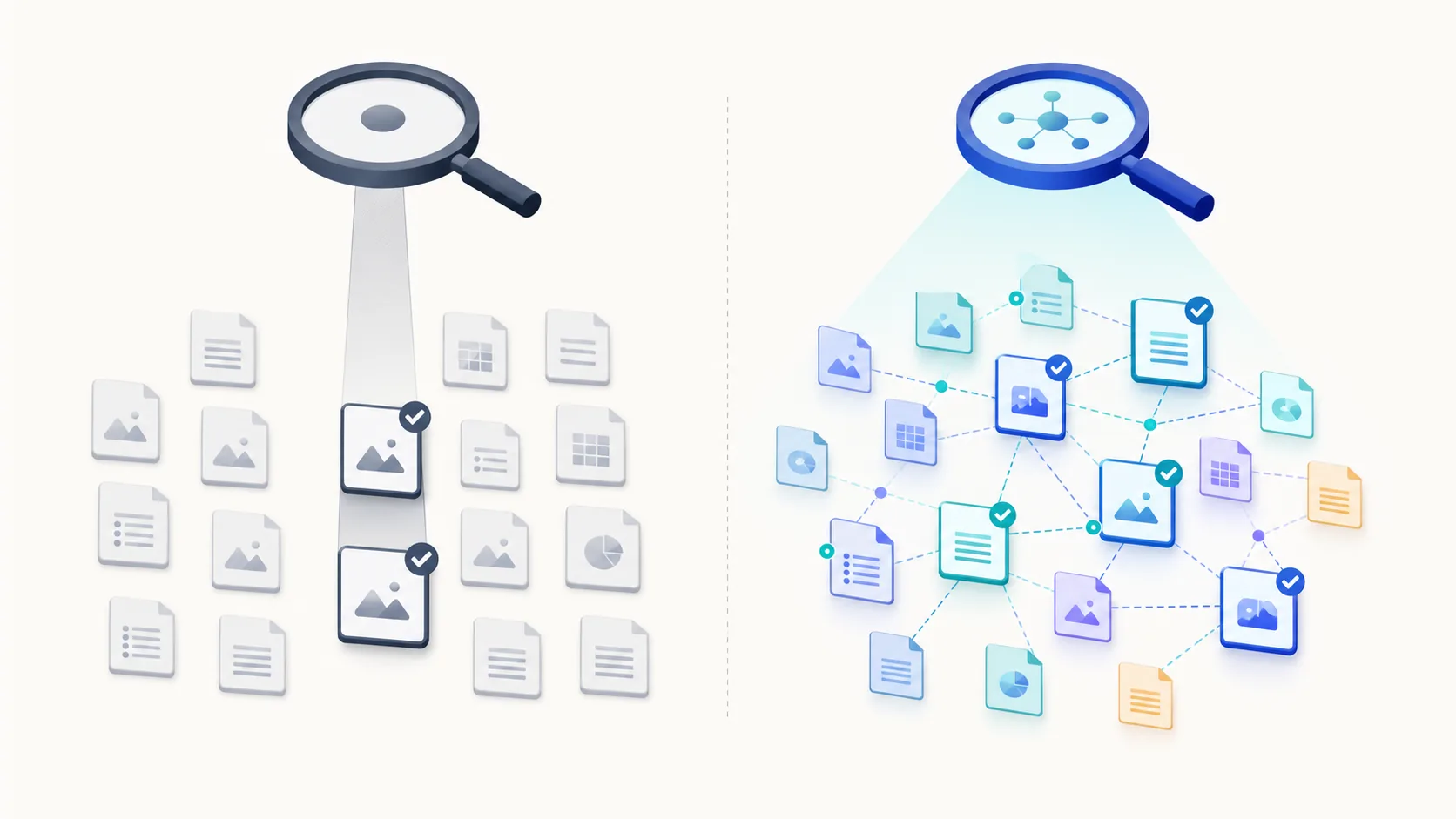
Diagram: ordinary search is useful for exact words; semantic search is useful for paraphrases and related information. Give each path its own role rather than replacing one with the other.
When it helps, and when information design comes first
| Vectorize tends to help when | Improve the information design first when |
|---|---|
| People describe the same need in varied language | Public pages, drafts, and internal information are not clearly separated |
| FAQs, guides, specifications, and cases live across multiple pages | The site content is outdated or its current source cannot be identified |
| You want to guide readers to a useful next page | Exact product names or model numbers are all readers need to find |
| An answer should link back to the original page | You plan to let AI answer freely without showing a source |
Semantic search does not replace information quality. Define what public information is responsible for first, then test which pages are returned for a small set of representative questions.
Start in three stages
You do not need to build a chatbot first. This order makes the value observable while keeping the service safe.
- Keep ordinary search: retain Pagefind for product names and error codes.
- Add related-content search: use Vectorize to show public pages near a question and evaluate them with representative test questions.
- Add evidence-grounded answers: introduce RAG only after you define eligible pages, source links, and when the system must decline an answer.
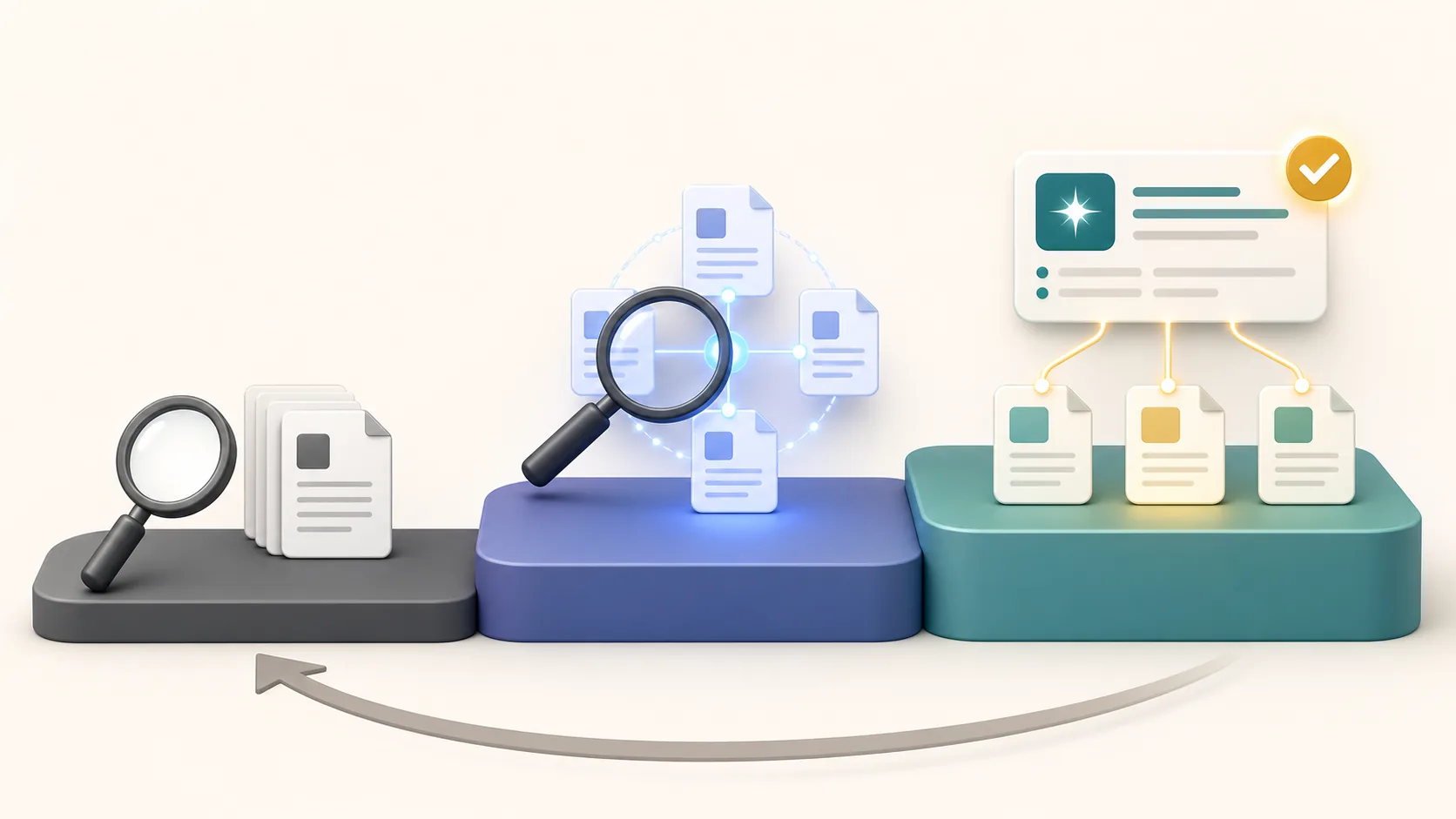
Diagram: ordinary search remains the foundation, so semantic search and AI answers can be validated gradually and safely rolled back.
This lets you validate the quality of searchable information before optimizing the appearance of AI answers.
A RAG answer starts by selecting evidence
| Decision | Simple starting point | Why |
|---|---|---|
| Question scope | Public site information only | Avoid using drafts or internal information in an answer |
| Evidence display | Link the original page with each answer | Readers can check the answer |
| Insufficient evidence | Say “I cannot confirm that” | Avoid plausible-sounding guesses |
| Search separation | Pagefind while typing; Vectorize/RAG after an explicit action | Keep data transfer, cost, and waiting time understandable |
| Update basis | Use published HTML and its release state | Keep drafts and unpublished edits out of answer evidence |
| Evaluation method | Check representative questions and their source-page links | Do not judge quality from a plausible answer alone |
RAG does not make incorrect answers impossible. The quality comes from selecting the corpus, checking evidence, and explicitly defining when not to answer.
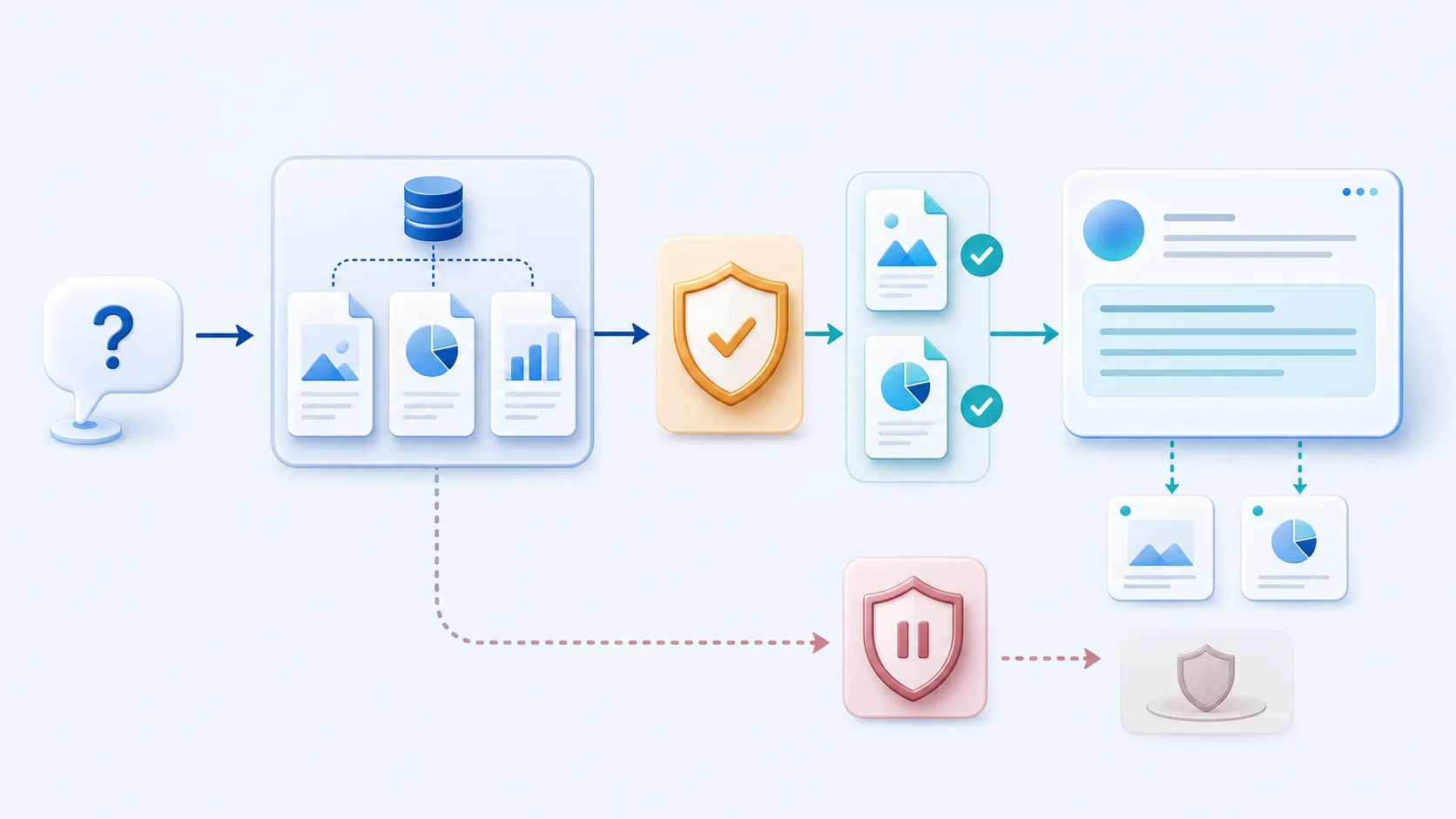
Diagram: RAG does not treat search results as an answer. It verifies source information and connects only usable evidence to the answer and citation.
Continue from the decision to the implementation
This page explains why to use Vectorize and RAG. Read these pages in order to connect the concept to a safe implementation:
- Detailed guide to implementing Vectorize safely for public-HTML corpora, content hashes, differential synchronization, Preview/Production separation, and rate limits.
- Technical design for an AI contact chat for AI input, API boundaries, and URL allowlists.
- Extending an official site with Astro and Cloudflare for the roles that let a static site add search and AI features safely.
Separating “we need better search” from “we need source-grounded AI guidance” makes the required implementation and verification much easier to see.
RAG basics
Four steps from a question to an evidence-based answer
A result is not an answer by itself: retrieve the original public page before using it as answer context.
Prepare public information
Include only pages that readers are allowed to see.
Search by meaning
Turn the question into an embedding and use Vectorize to find nearby information.
Select evidence
Check the source page, URL, and freshness before choosing what an answer may use.
Answer or defer
Generate an answer only with sufficient evidence; otherwise say that it cannot be confirmed.
Pagefind and Vectorize have complementary search roles
Pagefind: find exact words
- Quickly find product names, proper nouns, and error codes
- Works well as an ordinary search path while someone is typing
- Best when the reader already knows the term to search
Vectorize: find related meaning
- Return candidates for paraphrased questions and related topics
- Help readers identify which existing guide to open next
- Retrieve candidate evidence for a RAG answer
- Start from public information
- 1
- Use the right search path
- 2
- Expand in stages
- 3
Index only information readers are allowed to see, not drafts or internal data.
Keep Pagefind for exact terms and use Vectorize for meaning-based discovery.
Move from ordinary search to related-content search, then to evidence-grounded answers only when ready.
Five checks before you start
- There are already public guides, FAQs, specifications, or case studies to search
- Readers ask for the same information using different language
- Search results or answers should lead readers back to the source page
- There is a policy for declining an answer or returning to ordinary search when evidence is weak
- Ordinary search remains available for proper nouns and exact codes
Related pages
- Detailed guide to implementing Vectorize safelyRead this for public-HTML corpora, differential sync, Preview/Production separation, and API boundaries.
- Technical design for an AI contact chatSee the API boundary, input controls, and URL allowlist for an AI feature that guides visitors with public information.
- Extending an official site with Astro and CloudflareSee how to add search and AI features while keeping a static site as the foundation.
- Official Cloudflare Vectorize documentationReview the official capabilities, embeddings, and query guidance for Vectorize.
- Cloudflare's guide to vector databases and RAGSee how retrieved vector-search context can augment an LLM prompt.
- Cloudflare's guide to creating Vectorize indexesReview the index dimensions and distance metric that must be decided before an index is created.
Questions to answer before adoption
Does Vectorize replace ordinary site search?
No. Keep ordinary search for exact terms such as product names and error codes, and use semantic search to complement it when a reader's phrasing differs from the page wording.
Does RAG eliminate incorrect AI answers?
No. The corpus, evidence selection, source links, and a clear condition for not answering are what make an answer reviewable.
Do I need a chatbot before Vectorize has value?
No. A related-content search can already make existing information easier to reach without generating an answer.
What kind of site is a good first candidate?
Start with a site that already has public guides, FAQs, specifications, or cases, and where people ask for the same information in varied language.